AI has made code generation faster, but reviewing findings and fixing them manually can become a new bottleneck. Based on the Qiita article, this post shows how to connect SonarQube and MCP so an AI agent can retrieve and fix issues.
SonarQube MCP Server
Previously, developers had to copy issues from SonarQube and paste them into an AI chat to request fixes. With MCP, an AI client can retrieve issues through the SonarQube API, read local source files, and apply changes to those files.
Architecture and workflow
Use Gemini as the agent and connect local source code, the SonarQube MCP Server, and SonarQube Server. The cycle has four steps:
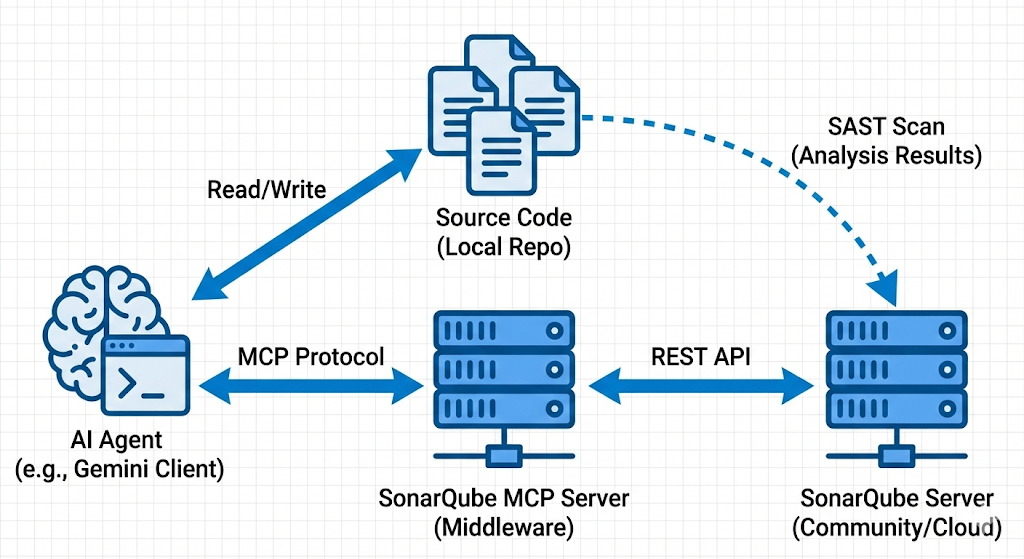
- The AI agent generates code from a prompt.
- SonarScanner analyzes the code and sends the results to SonarQube Server.
- The agent retrieves the resulting issues through the MCP Server.
- The agent uses source context to fix the issues.
You need Docker, SonarScanner CLI, and Gemini CLI (or another MCP-capable client).
Set up SonarQube Server and the MCP client
| |
Open http://localhost:9000, create an mcp-demo project, and generate a User Token. For Gemini CLI, register the MCP Server in ~/.gemini/settings.json:
| |
Replace the token and URL with values from your environment. Call get_system_health from the MCP client to verify connectivity. The MCP Server itself runs locally in a Docker container.
Run the analysis and repair cycle
First, ask the AI to generate a JavaScript Sudoku game with index.html, style.css, and script.js. Then run SonarScanner:
| |
After analysis, ask the agent to inspect issues in mcp-demo. The search_sonar_issues_in_projects MCP tool returned 11 issues covering cognitive complexity, function placement, contrast, array creation, and numeric conversions.
Ask the agent to fix the findings. It refactors the complex function, improves contrast, and applies the recommended APIs. Run another scan to confirm there are no open issues.
Summary
This setup lets an AI agent repeat the cycle “generate → analyze → retrieve issues → fix.” The MCP Server connects the agent to SonarQube and removes the manual copy-and-paste step. Re-run the analysis and review the results after applying fixes.